Monday, May 10, 2010

Nokia Picks Latest Symbian OS for N8 Smartphone


Nokia is using the latest open-source Symbian operating system for its new N8 smartphone. The Symbian Foundation praised Symbian^3 on Nokia's N8, but an analyst said S^3 has a interface similar to Nokia's S60 touchscreen smartphones without the problems. The latest Symbian OS is faster and supports gestures and HDMI connections to TVs.

Research In Motion is aiming to steal the smartphone spotlight with its device and operating-system Relevant Products/Services announcements at the BlackBerry WES 2010 conference Relevant Products/Services in Orlando this week, but the Symbian Foundation is working to turn some heads with a strategic announcement of its own.

On Tuesday, the foundation announced that Nokia has chosen Symbian^3 to power its new Nokia N8 smartphone. That makes Nokia the first handset manufacturer to tap S^3, Symbian's first platform release following its transition to open source in February.

Lee Williams, executive director of the foundation, said the Nokia N8 is an example of what's possible with the latest version of the Symbian platform. But Avi Greengart, an analyst at Current Analysis, isn't overly excited about the new operating system.

"Symbian 3 is fundamentally the same user interface that Nokia's S60 touchscreen phones offered, only it works. There isn't the inconsistency and the lagging," Greengart said. "Today's S60 touchscreen phones can drive you mad. Sometimes you need to press once and sometimes you have to press twice."

Getting to Know S^3

The S^3 offers usability and interface advances, faster networking Relevant Products/Services, acceleration for 2-D and 3-D graphics in games and applications, HDMI support, music-store integration Relevant Products/Services, an improved user interface with easier navigation and multi-touch gesture support, a feature-rich home screen, and the ability to run even more applications simultaneously.

Improvements to the user interface include direct "single tap" interaction that aims to make it much easier to complete common tasks. Multi-touch support for gestures such as pinch-to-zoom forms the foundation of a gesture framework that Symbian said can be extended and leveraged by developers.

The home screen offers support for multiple pages of widgets and a flick gesture to move between them. And one-click connectivity Relevant Products/Services for all applications works to simplify the process of connecting to the Internet.

HDMI support lets users plug their phone into a TV and watch a high-definition movie at 1080p quality without a Blu-ray player. And the music-store integration in the radio enables users to identify a song and learn more about it, while a "buy now" button links with the user's chosen music store for a quick purchase.

Behind Competitors

Symbian said the Nokia N8 takes full advantage of the S^3 platform with multiple, personalized home screens, a faster and more responsive user interface, and more efficient memory management to offer faster multitasking . But Greengart said it still doesn't compare to the leading competitors.

"The S^3 offers a familiar experience for someone who has grown up with the S60 on other Nokia phones, but the S^3 works more effectively for touchscreens," Greengart said. "The S^3 doesn't catch Nokia up to its rivals in terms of providing a user experience that was designed from the outset for touch. And in that respect it still badly lags Apple, Palm and Nokia."

Tuesday, May 4, 2010

Facebook in reality?

Ever wondered how the effects of facebook addiction would look like in reality? Well here check out this video..

Korea Republic Coach names provisional squad


Korea Republic have named a preliminary squad of 30 players for the 2010 FIFA World Cup South Africa™ which contains few surprises.

Coach Huh Jung-Moo, whose side were drawn in Group B alongside Argentina, Greece and Nigeria, included no uncapped players. Park Ji-Sung of Manchester United and Monaco's Park Chu-Young head a 13-strong foreign contingent, while 2002 FIFA World Cup hero Ahn Jung-hwan is also included as he bids for a third consecutive appearance on the global stage.

Huh will reduce the size of the squad to 23 after the Taeguk Warriors take on Ecuador in a FIFA World Cup warm-up match in Seoul on 16 May. "The Ecuador game is the last opportunity for the domestic players," said Huh. "We will also be checking the condition of the foreign-based stars."

There is no place for former Fulham and Reading star Seol Ki-Hyeon, who is still recovering from a knee operation. "Seol hasn't been included because he hasn't played as he is still recovering and hasn't trained. Of course, it is regrettable for the players who haven't made the squad but those 30 players have the opportunity to play a big part for the national team."

South Korea 30-man preliminary FIFA World Cup squad:
Kim Young-Kwang (Ulsan), Lee Woon-Jae (Suwon), Jung Sung-Ryong (Seongnam); Kang Min-Soo (Suwon), Kwak Tae-Hwi (Kyoto), Kim Dong-Jin (Ulsan), Kim Hyung-Il (Pohang), Oh Beom-Seok (Ulsan), Lee Young-Pyo (Al Hilal), Lee Jung-Soo (Kashima Antlers), Hwang Jae-Won (Pohang), Cho Won-Hee (Wigan), Cha Du-Ri (SC Freiburg), Cho Yong-Hyung (Jeju); Koo Ja-Cheol (Jeju), Ki Sung-Yong (Celtic), Kim Bo-Kyung (Oita), Kim Nam-Il (Tom Tomsk), Shin Hung-Min (Pohang), Kim Jae-Sung (Pohang), Kim Jung-Woo (Gwangju), Lee Chung-Yong (Bolton) Kim Chi-Woo (Seoul), Park Ji-Sung (Manchester United); Park Ju-Young (AS Monaco), Ahn Jung-Hwan (Dalian Shide), Lee Seung-Ryul (Seoul), Yeom Ki-Hun (Suwon), Lee Keun-Ho (Jubilo Iwata), Lee Dong-Guk (Jeonbuk).

Whose your world cup team?

Well guys, the FIFA world cup would be starting soon, and it will be on 11th June to be more specific. My team (again) for this world cup is going to be South Korea(Korea Republic). YES!! And I mean it. Some of my friends were like how come that's your favorite. And all I replied is "I believe in them"..lolz..Well basically yea they are like the underdogs and also they kinda won most of the friendly international matches after 2006 world cup. Plus there is >>PARK JI SUNG (the player who helps out man united every now and then lol).
So I'm up for it and I say bring it on. Nigeria, Greece and Argentina you better watch for the Koreans..And also just wana know wats your guys favorite team(s)? It would be great to know your views on your team..So hit the comment button to make it easier...

Long Time No See..haha

Hello people. Well it's a been a long time since I've posted well anything. It's been like months. And I sure need to catch up and spice up my blog with interesting tech stuff and all other stuffs that might be of your interest. So don't worry you will be seeing more of me from hereon, I hope so..lol..well I must because I am not being productive. haha...So catch later guys..

Friday, December 4, 2009

Continuity, a student-made game and brilliant Time-Waster


The game's website would suggest it's a student effort, but a quick search on the Web returns nothing else of interest.

Continuity is a very minimal Flash game reminiscent of those stick-man animations that you know and love from the Internet days of yore. The only task is to get through the door, picking up a key on the way. But there's a twist; there's always a twist.

The key mechanic of this game is the shifting of tiles -- a bit like one of those annoying puzzles where you have to re-arrange eight pieces in an array of nine spaces. But in Continuity, once you've got the blocks (or 'cards') into the right position, you hit space bar and travel into the game world itself.
Once there, you have to navigate the environment by jumping and running. There are holes you have to avoid, and you can only move between the blocks in specific directions (but it's never one-way -- you simply can't move between some blocks). The trick, then, is moving blocks, zooming in and moving around the world with your stickman, and then zooming back out to manipulate the blocks again to eventually reach the end point.

It's surprisingly fun, very unique, and well worth a quick poke! I almost forgot: the music is really fantastic too. If it's an original composition, I tip my hat to you sir!

Monday, January 5, 2009

Little-Known Computer Languages

Basic, Fortran, Cobol : These programming languages are well known and (more or less) well loved throughout the computer industry. There are numerous other languages, however, that are less well known that still have ardent devotees. In fact, these little-known languages generally have the most fanatic admirers. For those who wish to know more about these obscure languages and why they are obscure I present the following catalog.

SIMPLE

SIMPLE is an acronym for Sheer Idiot's Monopurpose Programming Linguistic Environment. This language, developed at the Hanover College for Technical Misfits, was designed to make it impossible to write code with errors in it. The statements are, therefore confined to BEGIN, END, and STOP. No matter how you arrange the statements, you can't make a syntax error. Programs written in SIMPLE do nothing useful. Thus they achieve the results of programs written in other languages without the tedious, frustrating process of testing and debugging.

SLOBOL

SLOBOL is best known for the speed, or lack of it, of its compiler. Although many compilers allow you to take a coffee break while they compile, SLOBOL compilers allow you to take a trip to Bolivia to pick up the coffee. Forty-three programmers are known to have died of boredom sitting at their terminals while waiting for a SLOBOL program to compile. Weary SLOBOL programmers often turn to a related (but infinitely faster) language, COCAINE.

VALGOL

(With special thanks to Dan and Betsy "Moon Unit" Pfau) From its modest beginnings in southern California's San Fernando Valley, VALGOL is enjoying a dramatic surge of popularity across the industry. VALGOL commands include REALLY, LIKE, WELL, and Y$KNOW. Variables are assigned with the =LIKE and =TOTALLY operators. Other operators include the "CALIFORNIA BOOLEANS", FERSURE, and NOWAY. Repetions of code are handle in FOR-SURE loops. Here is a sample VALGOL program:

14 LIKE, Y$KNOW (I MEAN) START
%% IF
PI A =LIKE BITCHEN AND
01 B =LIKE TUBULAR AND
9C =LIKE GRODY^MAX
4K (FERSURE)^2
18 THEN
4I FOR I= LIKE 1 TO OH MAYBE 100
86 DO WAH + (DITTY^2)
9 BARF(I) =TOTALLY GROSS(OUT)
-17 SURE
1F LIKE BAG THIS PROGRAM
? REALLY
$$ LIKE TOTALLY (Y$KNOW)

VALGOL is characterized by its unfriendly error messages. For example, when the user makes a syntax error, the interpreter displays the message GAG ME WITH A SPOON.

LAIDBACK

Historically, VALGOL is a derivative of LAIDBACK, which was developed at the (now defunct) Marin County Center for T'ai Chi, Mellowness and Computer Programming, as an alternative to the more intense atmosphere in nearby Silicon Valley. The center was ideal for programmmers who liked to soak in hot tubs while they worked. Unfortunately, few programmers could survive there for long, since the center outlawed pizza and RC Cola in favor of bean curd and Perrier. Many mourn the demise of LAIDBACK because of its reputation as a gentle and nonthreatening language. For Example, LAIDBACK responded to syntax errors with the message, SORRY MAN, I CAN'T DEAL WITH THAT.

SARTRE

Named after the late existenitial philosopher. SARTRE is an extremely unstructured language. Statements in SARTRE have no purpose; they just are there. Thus SARTRE programs are left to define their own functions. SARTRE programmers tend to be boring and depressed and are no fun at parties.

FIFTH

FIFTH is a precision mathematical language in which the data types refer to quantity. The data types range from CC, OUNCE, SHOT, and JIGGER to FIFTH (hence the name of the language), LITER, MAGNUM, and BLOTTO. Commands refer to ingredients such as CHABLIS, CHARDONNAY, CABERBET, GIN, VERMOUTH, VODKA, SCOTCH and WHATEVERSAROUND. The many versions of the FIFTH language reflect the sophistication and financial status of its users. Commands in the ELITE dialect include VSOP and LAFITTE, while commands in the GUTTER dialect include HOOTCH and RIPPLE. The latter is a favorite of frustrated FORTH programmers who end up using the language.

C-

This language was named for the grade recieved by its creator when he submitted it as a class project in a graduate programming class. C- is best described as a "Low-Level" programming language. In fact, the language generally requires more C- statements than machine-code statements to execute a given task. In this respect, it is very similar to COBOL.

LITHP

This otherwise unremarkable language is distinguished by the absence of an "s" in its character set. Programmers and users must substitute "TH". LITHP is said to be utheful in proceththing littth.

DOGO

Developed at the Massachusetts Institute of Obedience Training. DOGO heralds a new era of computer-literates. DOGO commands include SIT, STAY, HEEL and ROLL OVER. An innovative feature of DOGO is "PUPPY GRAPHICS", in which a small cocker spaniel occasionally leaves a deposit as he travels across the screen.

Now you must have known about these unknown programming languages...

Computer Keypad Calculator


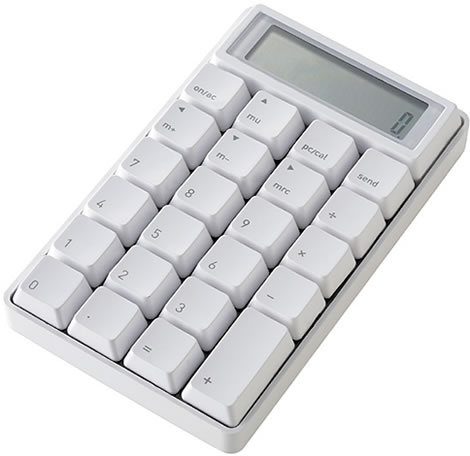
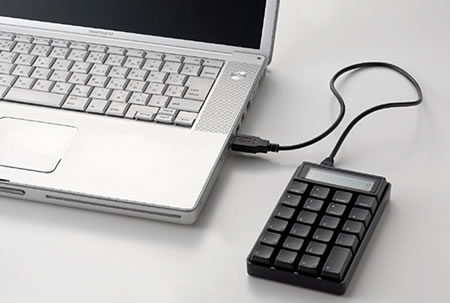
Instead of going for yet another one of those attempts of putting a calculator inside a computer mouse, like Ezkey, Sanwa, and others have tried, the Japanese company Takumi decided to try something different by designing a calculator like a keypad.


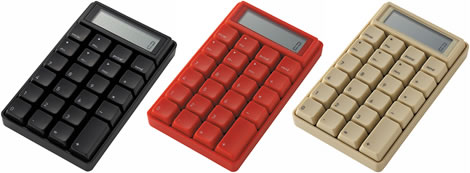
The result is a geeky cool looking calculator which can be connected to the USB port of your Windows based computer. It measures W84×H140×D23 mm and is available in white, black, red and beige.

The Takumi Keypad Calculator costs ¥5250 (about $46 USD) at caina.jp.


Sunday, January 4, 2009

Fijian Swear Words

Phrase Meaning
Caita Fuck
Kubu Suck
Magai Chinana Mother Fucker
Sona Asshole
Veicai Sexual intercourse
Vutu Sona Anal Sex
Vutulaki Wanker


If u ever come to Fiji these words might become handy...lol

Monday, May 12, 2008

Programmer's Notepad


Programmer’s Notepad 2.0.8 Stable Released

Finally a new stable build! Programmer’s Notepad 2.0.8 has been just over a year in the making. Some of the highlights of this release:

  • Extensions interface, allows extension of PN using C++ add-ins
  • Python extension (PyPN), allows scripting of PN using Python
  • Tag browsing
  • Keyboard customisation
  • Comment insertion/removal
  • Autocomplete (based on keywords and tags)
  • Code templates

Downloads

Saturday, March 15, 2008

Earn Quick Cash Online thru PTC sites

Here I will list my top 5 Choices of PTC sites where you can earn quick cash by just clicking on ads.

But before you start signing up, you will need to have an Alertpay acount where all you money will be transferred to. To create an Alertpay account: Click Here

Now here is the top 5 PTC's to sign up::

1. Bux.to

Standard Members : Earn $0.01/ad & 8-12 ads daily..
Premium Members : Earn $0.0125/ad & 20-50 ads daily...
Referral Earnings : 100%
Min. Payout : $10
Rating : 5/5

Click Here To Sign Up Now

2. Bux3.com

Standard Members: Earn $0.01/ad & 10-16 ads daily + Offers

Premium Members : Earn $0.0125/ad & 20-50 ads daily + Offers
Referral Earnings : 100%
Min. Payout : $10
Rating : 4.9/5

Click Here To Sign Up

3. Buxit.info

Standard Members : Earn $0.01/ad & 8-12 ads daily..
Premium Members : Earn $0.025/ad & 20-50 ads daily...
Referral Earnings : 100%
Min. Payout : $5
Rating : 4.9/5

Click Here To Sign Up

4. Xclix.net

Standard Members : Earn $0.01/ad & 8-12 ads daily..
Premium Members : Earn $0.015/ad & 20-50 ads daily...
Referral Earnings : 50%
Min. Payout : $5
Rating : 4.6/5

Click Here To Sign Up

5. Boostbux.info

Standard Members : Earn $0.01/ad & 8-12 ads daily + Offers
Premium Members : Earn $0.01/ad & 20-50 ads daily + Offers + Referral: 100%
Referral Earnings : 50%
Min. Payout : $3
Rating : 4.5/5

Click Here To Sign Up


Saturday, February 23, 2008

War Over !!!


The final shots have been fired in the high definition format war, and as the battlefield falls silent Blu-Ray emerges victorious, leaving HD DVD battered, broken and defunct.


In a high-def rerun of the VHS/Betamax conflict of the 70s and 80s, the two rival formats have sluged it out over the last two years in a battle for our hearts, minds and wallets.

Japanese manufacturer Toshiba launched HD DVD confident that the format, which was based on existing DVD technology, would be perfectly placed to take advantage of the rise in sales of high-def TVs.

After all, they reasoned, even though HD DVD weren't able to store quite as much data as a Blu-ray disc, the discs and players were cheaper to produce than Sony's format, and the pictures and sounds were just as good.

HD-DVD was also, just, first out the traps and initially had strong support from Hollywood. But the expected sales never materialised, just one million in total, as consumer indifference and confusion set in.

PS3And of course, there was Sony's trump card.The Blu-Ray playing Playstation3 may have underperformed commercially as a gaming console, but in the past 18 months they have managed to get six million of them into our living rooms.

More and more movie studios got behind Sony's format, and Warner Brothers' announcement at the beginning of the year that it would exclusively support Blu-Ray effectively signalled HD DVD's demise.

The final nail was hammered into the format's coffin earlier this month, when the worlds largest retailer, Wal-mart, threw its considerable weight behind Blu-ray.

So, Toshiba and its partners will now cease producing HD DVD hardware and Blu-ray is left with a clear run at the high- def market.

UNIX Introduction

What is UNIX?

UNIX is an operating system which was first developed in the 1960s, and has been under constant development ever since. By operating system, we mean the suite of programs which make the computer work. It is a stable, multi-user, multi-tasking system for servers, desktops and laptops.

UNIX systems also have a graphical user interface (GUI) similar to Microsoft Windows which provides an easy to use environment. However, knowledge of UNIX is required for operations which aren't covered by a graphical program, or for when there is no windows interface available, for example, in a telnet session.


Types of UNIX

There are many different versions of UNIX, although they share common similarities. The most popular varieties of UNIX are Sun Solaris, GNU/Linux, and MacOS X.

At shools and colleges, people use Solaris on servers and workstations, and Fedora Linux on the servers and desktop PCs.


The UNIX operating system


The UNIX operating system is made up of three parts; the kernel, the shell and the programs.

The kernel

The kernel of UNIX is the hub of the operating system: it allocates time and memory to programs and handles the filestore and communications in response to system calls.

As an illustration of the way that the shell and the kernel work together, suppose a user types rm myfile (which has the effect of removing the file myfile). The shell searches the filestore for the file containing the program rm, and then requests the kernel, through system calls, to execute the program rm on myfile. When the process rm myfile has finished running, the shell then returns the UNIX prompt % to the user, indicating that it is waiting for further commands.

The shell

The shell acts as an interface between the user and the kernel. When a user logs in, the login program checks the username and password, and then starts another program called the shell. The shell is a command line interpreter (CLI). It interprets the commands the user types in and arranges for them to be carried out. The commands are themselves programs: when they terminate, the shell gives the user another prompt (% on our systems).

The adept user can customise his/her own shell, and users can use different shells on the same machine. Staff and students in the school have the tcsh shell by default.

The tcsh shell has certain features to help the user inputting commands.

Filename Completion - By typing part of the name of a command, filename or directory and pressing the [Tab] key, the tcsh shell will complete the rest of the name automatically. If the shell finds more than one name beginning with those letters you have typed, it will beep, prompting you to type a few more letters before pressing the tab key again.

History - The shell keeps a list of the commands you have typed in. If you need to repeat a command, use the cursor keys to scroll up and down the list or type history for a list of previous commands.


Files and processes

Everything in UNIX is either a file or a process.

A process is an executing program identified by a unique PID (process identifier).

A file is a collection of data. They are created by users using text editors, running compilers etc.

Examples of files:

  • a document (report, essay etc.)
  • the text of a program written in some high-level programming language
  • instructions comprehensible directly to the machine and incomprehensible to a casual user, for example, a collection of binary digits (an executable or binary file);
  • a directory, containing information about its contents, which may be a mixture of other directories (subdirectories) and ordinary files.

The Directory Structure

All the files are grouped together in the directory structure. The file-system is arranged in a hierarchical structure, like an inverted tree. The top of the hierarchy is traditionally called root (written as a slash / )


In the diagram above, we see that the home directory of the undergraduate student "ee51vn" contains two sub-directories (docs and pics) and a file called report.doc.

The full path to the file report.doc is "/home/its/ug1/ee51vn/report.doc"


Starting an UNIX terminal

To open an UNIX terminal window, click on the "Terminal" icon from the drop-down menus.


An UNIX Terminal window will then appear with a % prompt, waiting for you to start entering commands.

Cleaning a virus manually

To get rid of a virus manually you will need a little knowledge on command line instructions/cmd..

  1. Get a hijackthis program from download.com
  2. select "Do a system scan only". Here you will see those processes that run on startup and those that were added to the registry.
  3. Next, know those annoying filenames of .exe that triggers the virus' actions. These are considered or often found at the startup. Viruses evolve but their filenames are all the same.
  4. if you can access the task manager, end task all processes that are connected to the virus. If not, use the process manager in the hijackthis.Do the same,kill those processes that are connected to the virus.
  5. Open the cmd.exe. Here manually delete the executable files that will run on startup. To find it easier to delet, try searching all filenames that you wish to delete. Those files that should not be on that path will be deleted.
  6. Restart and repeat step 4 if not resolved.
Just don't worry as computers can still be repaired. Just don't delete the system files...

Thursday, February 21, 2008

NVIDIA 9600 GT Reviewed: Best Low-Cost Gaming Card With Anti-Aliasing


NVIDIA's first GeForce 9 series card officially launched today, the budget 9600 GT, which is based on a shrunken version of the G92 graphics processor in their mid-range 8800 GT and the newer GTS cards.

It's actually extremely similar to the 8800 GT, but smaller and more efficient. It has half the number of stream processors but at a higher frequency, so Tom's Hardware says you're looking at a 38 percent drop in raw processing power vs. the 8800 GT cards. However, in the real gaming world, performance was only about 12 percent lower than the 8800 GT. So while it's not enough of a departure to warrant being branded a 9 series card, it's the "the best card in its price range for performance with antialiasing enabled."

Wednesday, February 20, 2008

Connecting to a remote computer using Telnet

Telnet allows you to use your computer as a terminal for a remote computer (typically a mainframe or Unix-based computer). With telnet, you can search a database, access an online catalog, read your e-mail or participate in interactive games like multiuser dungeons (MUDs). You can log in according to the permissions that the remote host has given you. Now follow the steps below:
1. Install a telnet program (client) on your computer. HyperTerminal, included with Windows, will perform many telnet operations. You can also locate an array of freeware, shareware or commercial telnet clients from various software Web sites.

2. Open your telnet program.

3. Enter the telnet address in the address box. Click OK.

4. Enter your login ID. If you have been given special permission, your host will have provided you with a login ID. If it is an anonymous site, you may be able to log in as "guest" or by using your e-mail address.

5. Once you are logged in, the procedure varies depending on how the host has been set up. Follow instructions that appear on the screen.

Tips:
  • You may be able to access your telnet program directly from your browser if you have configured your software correctly. To use your browser, type the telnet address in the address bar. It may be something such as "telnet: far.away.computer.com" or "telnet far.away.computer.com."
  • Some telnet programs require a colon between "telnet" and the address. Others require a space.
  • Telnet is typically used to turn your computer into a terminal for a mainframe or Unix-based computer. Don't expect to be able to use Windows or Macintosh commands.
  • Telnet can be a useful way to access your e-mail away from home, because you don't need to remember SMTP or POP server names. Not all Internet service providers (ISPs) allow telnet access, however, and you will probably need to use a Unix-based e-mail client this way.
  • If one letter is typed incorrectly, the telnet search will fail.

Download Free C & C++ Programming ebooks

Click on the links, then click on proceed.

Making a GUI in JAVA


Here in this tutorial you will be showed how to make a GUI in JAVA ...i.e.. how to make frames, panels, buttons and how to display dialog boxes.


The 2 most important things you will need :--
  • Basic knowledge of JAVA.
  • A JAVA compiler (like BlueJ or Eclipse)
Now just follow these steps:
  1. A JAVA GUI Program should be designed like the diagram below (at least it's what I think): - main() - Frame -- Content Panel --- Buttons --- Text Areas --- Menus --- and so on
  2. Import some important files. import java.awt.*; import java.awt.event.*; import javax.swing.*;
  3. Create a new class, extend it to ActionListener and create the main Method. public class HelloGui implements ActionListener { public static void main(String[] args) { } }
  4. Under the main method create an instance of the class itself. HelloGui myProgram = new HelloGui();
  5. Create buttons and attach action listeners. JButton ladiesButton = new JButton("Ladies"); ladiesButton.setActionCommand("clickfromLadies"); ladiesButton.addActionListener(myProgram); JButton gentsButton = new JButton("Gents"); gentsButton.setActionCommand("clickfromGents"); gentsButton.addActionListener(myProgram);
  6. Create an instance of the JPanel JPanel contentPanel = new JPanel(new GridLayout(0, 1));
  7. Add the created buttons in the content panel and create a window/frame. contentPanel.add(ladiesButton); contentPanel.add(gentsButton);
  8. Create an instance of the JFrame to give your GUI Program a window. JFrame mainWindow = new JFrame("Hello Java GUI Program by Rooseveltrp.com");
  9. Add the content pane in the window. Rebuild the window and then display it. mainWindow.getContentPane().add(contentPanel); mainWindow.pack(); mainWindow.setVisible(true);
  10. Create a new method called public void actionPerformed(ActionEvent e).
  11. Inside the method actionPerformed enter the following codes to control the clicks from your button. public void actionPerformed(ActionEvent e) { if(e.getActionCommand().equals("clickfromLadies")) { JOptionPane.showMessageDialog(null, "Roosevelt Loves Ladies!"); } else if(e.getActionCommand().equals("clickfromGents")) { JOptionPane.showMessageDialog(null, "Honestly, Roosevelt doesn't care about men!"); } }
  12. If you've done everything well your codes will look just like below: import java.awt.*; import java.awt.event.*; import javax.swing.*; public class HelloGui implements ActionListener { public static void main(String[] args) { HelloGui myProgram = new HelloGui(); JButton ladiesButton = new JButton("Ladies"); ladiesButton.setActionCommand("clickfromLadies"); ladiesButton.addActionListener(myProgram); JButton gentsButton = new JButton("Gents"); gentsButton.setActionCommand("clickfromGents"); gentsButton.addActionListener(myProgram); JPanel contentPanel = new JPanel(new GridLayout(0, 1)); contentPanel.add(ladiesButton); contentPanel.add(gentsButton); JFrame mainWindow = new JFrame("Hello Java GUI Program by Rooseveltrp.com"); mainWindow.getContentPane().add(contentPanel); mainWindow.pack(); mainWindow.setVisible(true); } public void actionPerformed(ActionEvent e) { if(e.getActionCommand().equals("clickfromLadies")) { JOptionPane.showMessageDialog(null, "Roosevelt Loves Ladies!"); } else if(e.getActionCommand().equals("clickfromGents")) { JOptionPane.showMessageDialog(null, "Honestly, Roosevelt doesn't care about men!"); } } }
  13. Program should output the following results.

Friday, February 15, 2008

Make firefox 10x faster

1. Type "about:config into the address bar and hit enter. Scroll down and look for the following entries:

2. Alter the entries as follows:

Set "network.http.pipelining" to "true"
Set "network.http.proxy.pipelining" to "true"

set "network.http.pipelining.maxrequests" to some number like 30. This means it will make 30 requests at once.

3. Lastly right-click anywhere and select New-> Integer. Name it "nglayout.initialpaint.delay" and set its value to "0". This value is the amount of time the browser waits before it acts on information it recieves.

See the difference for yourself...

Thursday, February 14, 2008

The Sony Ericsson Z770

z770

This is a phone we've seen in the wild on a couple occasions, but we had one detail dead wrong: the model number. It turns out that Sony Ericsson's newest Z series flip is actually the Z770, not the Z660 we'd heard before. The company is billing the Z770 as a phone fit for people who need access to the internet (web and email, specifically) but aren't necessarily interested in stepping up to a full-fledged smartphone, featuring "easy" email setup, zoom / pan features in the web browser along with an actual mouse pointer (anyone familiar with S60's browser will get the idea here), and integrated support for Exchange ActiveSync. The GSM / EDGE 900 / 1800 / 1900, HSDPA 2100 handset will hit shelves in the second quarter in Vogue Red, Graphite Black, and Exquisite Gold.